Archive for the ‘Projects’ Category »
Hitori version 0.2
It’s been a long time coming, but here’s Hitori version 0.2!
As a short overview, the new version introduces:
- Dynamic board sizing (allowing for boards from 5×5 to 10×10)
- Rendering improvements, a Tangoisation, and a conversion to use GtkStyle
- Relicense to GPLv3+
- A new user manual!
- Improvements to the algorithms, halving memory usage in the best case
- A new icon by Jakub Szypulka
- A desktop file
Hitori now depends on GTK+ >= 2.13, so it may not be easily compilable on some distributions, which is an unfortunate side-effect of using the new gtk_show_uri function.
As before, please contact me to report bugs.
I don’t really have any plans to extend the program any further, but if anybody has any ideas, I’m open to them.
Diary version 0.3
I’ve just released Diary 0.3.1. This is a pretty simple release, fixing a crasher bug, improving corner-case encryption behaviour, adding a French translation by Jean-François Martin, a swizz icon by Jakub Szypulka (and a corresponding desktop file), and finally adding basic search support.
There are no dependency or config changes with this release, so upgrading should be seamless. Any bugs should be reported to the Diary product on GNOME Bugzilla.
Update: I’ve just released 0.3.1, which is a semi-brown-paper-bag release to fix build failure when compiling without encryption support, as well as fix the desktop file translation.
Diary version 0.2
Using my exam leave productively, I’ve tidied up and released version 0.2 of my diary editor. This version fixes the crash some people were getting with version 0.1, and introduces database encryption and printing support.
The new version should seamlessly upgrade plaintext databases to encrypted ones, and uses the key from /desktop/pgp/default_key in GConf. If you don’t want encryption support – perhaps, for example, as it depends on GPGME – you can compile with –disable-encryption.
The printing support allows you to print the entries in a specified date range in a simple format — nothing suitable for binding for posterity’s sake, unfortunately. It’s there nonetheless.
Get the Bazaar branch from my website with bzr branch -r tag:V_0_2_0 http://tecnocode.co.uk/diary, from Launchpad, or download the tarball!
Diary editor
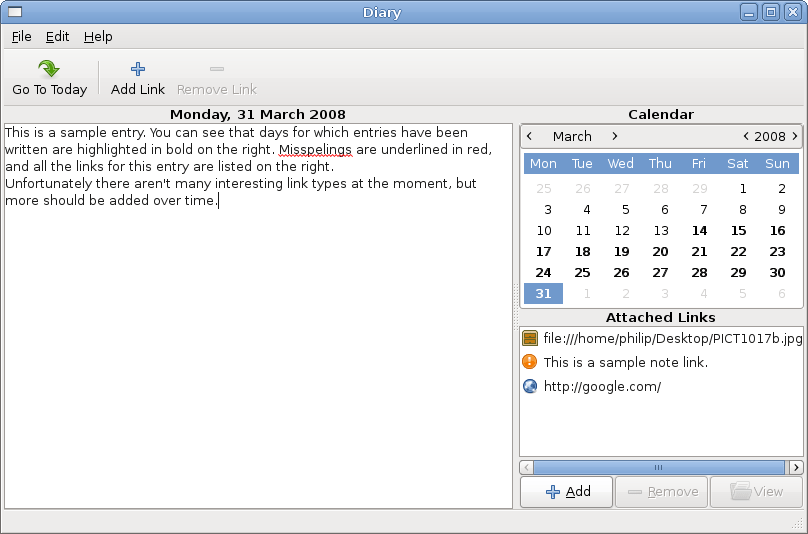
I’ve been keeping a personal diary for a while, but recently I’ve found that my previous storage method for it – keeping each day’s entry in a separate file, stored in a folder hierarchy – was getting too unwieldy. That’s why over the last few weeks I’ve written a small program to manage a diary.
I initially started writing it in Vala, but I found that I was having to put in dirty hacks every couple of tens of lines just to get the simplest things working with an SQLite database. Either due to my own lack of knowledge of Vala, or teething problems for the language and its bindings, I couldn’t get it to work, so about a week ago I scrapped it and ported the program to old-fashioned C.
So here it is: version 0.1 of my diary program. It supports basic editing of diary entries, a calendar view of the month and the ability to add “links” to each entry. A “link” is something which connects the diary entry to the wider world, much like a hyperlink connects one web page to another. At the moment only “URI”, “file” and “note” link types are supported, but in the future I plan for one to be able to link to anything from an F-Spot album to a section of a chat log in Empathy. Such links would allow references to conversations, e-mails, photo albums (etc.) in diary entries to be easily followed to find the goodies mentioned.
I also have plans to add Evolution calendar integration, as well as potential integration with Mugshot. It would be nice to see diary entries which can show all of what happened on that day, from doctor’s appointments in Evolution to the songs Mugshot says you listened to.
Keeping my feet more grounded in reality, however, I think the next thing on the agenda is encryption for the database the diary uses, so your darkest secrets aren’t so easily discovered.
To get it, you can either download the tarball or get the latest bzr tree from my website using the following command:
bzr branch http://tecnocode.co.uk/diary/
Thanks to people in the comments for pointing out a better way of branching.
The only requirements are gtk+-2.0 >= 2.12, sqlite3 and gtkspell-2.0, and it’s built in the usual fashion.
Feedback is welcomed warmly and given somewhere to stay for the night.
Unfortunately still working on that coursework, I’ve just added support in the API documentation makefile to automatically generate a class hierarchy diagram using the GObject hierarchy file created by gtk-doc and marshalling it to GraphViz. It basically analyses the depth of each line in the hierarchy file and creates relationships in the dot file as appropriate. It doesn’t sound complex, but it took a heck of a lot of fiddling to get automake happy with my syntax.
graph-build.stamp:
echo "digraph class_hierarchy" > $(DOC_MODULE).dot
echo "{" >> $(DOC_MODULE).dot
(IFS=$$'\n'; \
for current_line in `cat $(DOC_MODULE).hierarchy`; do \
depth_colours=( red green blue yellow ); \
depth=`echo $$current_line | grep -o " " | wc -l | sed s/\ //g`; \
echo "$$current_line [shape=box, color=$${depth_colours[$$depth]}]" >> $(DOC_MODULE).dot; \
last_line[$$depth]=$$current_line; \
if [ $$depth -gt 0 ]; then \
echo "$${last_line[`expr $$depth - 1`]} -> $$current_line" >> $(DOC_MODULE).dot; \
fi; \
done)
echo "}" >> $(DOC_MODULE).dot
dot -Tpng $(DOC_MODULE).dot > $(DOC_MODULE).png
touch graph-build.stamp
Still working on that coursework project, I’m now building PDFs of the three pieces of documentation the application itself requires: the API reference, the source code listings and the user manual.
Using gtk-doc to build the API reference makes it quite easy to add something in the Makefile to build a PDF from the DocBook:
I’ve put this at the bottom of the Makefile.am, and it’s all working nicely, apart from the fact that distcheck (legitimately) complains about me redefining all-local. I can’t find any other way to make it build the PDF while also building the normal docs with make docs, so my question here is: how do I make this implementation cleaner?
If anybody wants to use it, they’ll need to install dblatex.
The next piece of documentation is the source code listing. This is completely custom, using source-highlight to make LaTeX files for each source file, and then pdflatex to build them into a PDF.
I’m quite pleased with the way this works, although I’m sure there will be better solutions out there. source-highlight deposits many LaTeX files in the build directory, which are then included in the PDF build by dint of being automatically concatenated together and included by a surrounding LaTeX file, project-name-source.tex.
docs/source/two-hundred-club-source.tex
Finally, the user manual also needs building into a PDF. This again uses dblatex, although it’s a little more complex, as a PDF has to be built for each language directory in the help directory.
Hopefully some of that will be helpful to somebody in a similar situation, and I’d welcome any hints or pointers as to how to improve the implementations, as my automake powers are about as strong as a damp tissue.
ocPortal 3 public beta out!
Well, we finally managed it.
After months of work, we’ve let ocPortal 3 public beta 1 loose in the wild, for public beta testing.
It’s been improved a lot from version 2; most notably with a new and even-more standards-compliant theme. Lots of new features (such as instant messaging, OcCLE, and improved statistics) have been added, standards verification and support has been improved no end, with ocPortal now optionally checking submitted content for standards compliance.
I probably haven’t spent as much time working on it as I should’ve, and my work isn’t half as far-reaching as Chris’, but he’s employing himself full-time to work on it, while I’m technically only an intern.
However, I have designed and built the OcCLE system from the ground up, and it’s a beauty (even if I do say so myself). It’s certainly original (thanks to Chris and some alcohol for that).
If you’ve been reading the developer blog, you’ll have seen all the posts in the May countdown, and have more of an idea about the features than I can write in this blog. Certainly worth a read. ![]()
Enough of the marketing pitch, I hear you say! Why not download ocPortal 3 now, and give it a try? If you find any bugs (whether they be visual niggles, lacking documentation, or just plain old bugs), don’t hesitate to report them to us. We want to make ocPortal the best! ![]()
Elite Force: Total Conversion
Well, since you can’t see any recent blog posts, it’s obvious that I’ve been busy! ![]()
For the past month I’ve been furiously coding for Elite Force: Total Conversion, and I can say that our code is taking shape. ![]()
I’ve coded most of the weapons and got them to a semblance of their final form. The pickups are just about all coded and working, and the useable pickups are currently under construction.
Our other fine coders have whipped up a nice everything-else, and we’re nearing the time when we can say “Yah-boo. We’ve got a working game.
“
On a side note, ocPortal 2.5 beta-testing is coming to an end, and it’s looking good. ![]()
http://tecnocode.co.uk/ up
I’ve just finished the first ‘draft’ of http://tecnocode.co.uk, my new company website.
I haven’t written all the text, and some of the images need tweaking, but the main bits are there, and some feedback would be nice. ![]()
The first install.php
Here it is! The first taster of what’s to come from the forges of Helios. ![]()
I created this installer file in only ten minutes, using Helios. It was created entirely by Helios, and has not been modified afterwards.
The interface could do with a little tweaking, and I think a little of the intelligent page detection logic is a little rusty. However, it works, and it works very well!